Controls
Notice: These docs are in progress and may be incomplete. If you have any questions or feedback, please let me (@thedevbird) know in our Discord server.
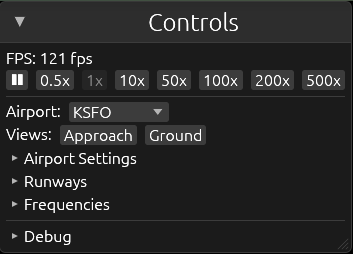
The Cntrols menu.
Enable or disable active runways
You can enable and disable which runways are active for arrivals and departures. Simply check and uncheck the "ARR" or "DEP" boxes to enable a runway for arrival or departure (or click "Both" to enable both arrivals and departures; click it again to disable both).
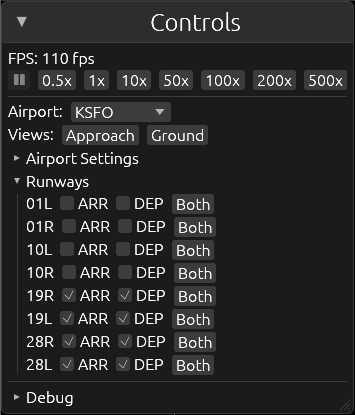
If a runway is disabled for arrivals, Auto ATC won't sequence arrivals to land on that runway. Conversely, if a runway is disabled for departures, Auto ATC won't sequence departures for takeoff on that runway.
Workload tools
Airwave comes with four workload settings for each airport. These help you manage your workload and split work between you and Auto ATC.
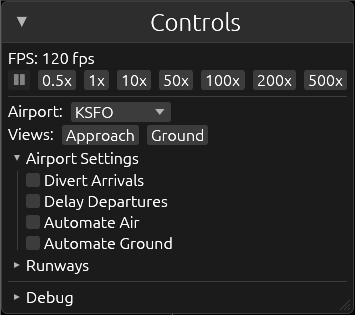
The first two settings determine how new arrivals and departures are handled.
Divert Arrivals
If enabled, if an arrival crosses into your airspace, it will automatically be deverted back to its originating airport. This will not affect aircraft already within your airspace.
If disabled (default), incoming arrivals will cross into your airspace, under your jurisdiction for vectors to land.
Delay Departures
If enabled, no new departures will be created. This will not departures that are already at a gate, waiting for taxi.
If disabled (default), dormant (grey; parked) aircraft will turn into departures once scheduled by our internal scheduling engine.
Auto ATC
The next two settings control whether Auto ATC acts on aircraft in the air and/or ground.
Automate Air
If enabled, Auto ATC will handle all aircraft in the air, vectoring approaches to land and ensuring departures are following their flight plan. This will affect all airborne aircraft within your airspace.
If disabled (default), Auto ATC will not take effect for aircraft in the air.
Automate Ground
If enabled, Auto ATC will handle all aircraft on the ground, taxiing departures for takeoff and arrivals to the gates. This will affect all aircraft on the ground. Auto ATC will not clear an aircraft for takeoff if a landing aircraft is close to touching down on the same runway.
If disabled (default), Auto ATC will not take effect for aircraft on the ground.
Frequency List
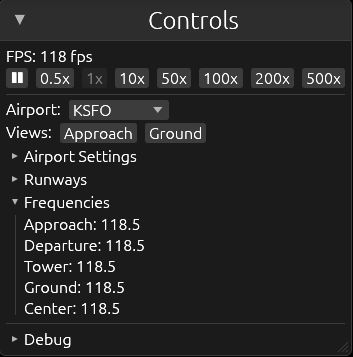
You can view the frequency list for the selected airport by expanding the "Frequencies" section.